
An image generation MCP server lets your AI assistant make images for you as a tool call, and GenBatch runs a hosted one you add by pasting a single URL. No install, no separate model API key, no server to keep alive. You ask Claude, ChatGPT, Gemini CLI, Cursor, or another MCP-capable client for images in plain language, and they come back in the conversation, charged to your own GenBatch credits at one credit each.
That last part is the difference. Most image generation MCP servers you find are code you have to clone, run, and wire to your own OpenAI or Replicate account. GenBatch is the opposite: it is already running, and your account is the only thing you connect.
Key points
- GenBatch is a hosted image generation MCP server. Nothing to install or keep running.
- One access key works for both the MCP server and the REST API.
- Flexible billing: 1 credit per image, with one-time credits or optional subscriptions; a failed request costs nothing.
- Built for bulk: generate 1 to 10 copies of one prompt, add public HTTPS reference image URLs, or run up to 20 prompts / 50 images total with
items[].
What is an image generation MCP server?
It is a server that exposes image generation as a callable tool over the Model Context Protocol (MCP), the open standard AI clients use to talk to external tools. Instead of you opening a separate app, pasting a prompt, waiting, and downloading, your assistant calls the tool directly and hands you the result.
MCP is the same mechanism that lets Claude read a file or query a database. An image server just adds a generate_image tool to that list. Once it is connected, "make me 5 square thumbnails of a matte black water bottle" becomes a single tool call your assistant runs on its own.
The catch with most of them is setup. Search for one and you land on GitHub repos that wrap Flux, DALL-E, or gpt-image and expect you to run the process locally and bring your own paid API key. That works, but it is infrastructure you now own. GenBatch skips that entirely.
Why use a hosted MCP server instead of a self-hosted one?
Because a hosted server removes the two jobs you would otherwise inherit: running the process and supplying a model key. GenBatch is already live, stateless, and reachable at one URL, so you connect your account and start generating.
Here is the practical split between the two approaches.
We think the self-hosted route makes sense if you want deep control over a specific open model and enjoy running infrastructure. For everyone else, a hosted server is less to break. There is no process that dies overnight, and because the GenBatch server is stateless, it keeps working across restarts and multiple replicas without any session juggling on your side.
How do you connect GenBatch as an MCP server?
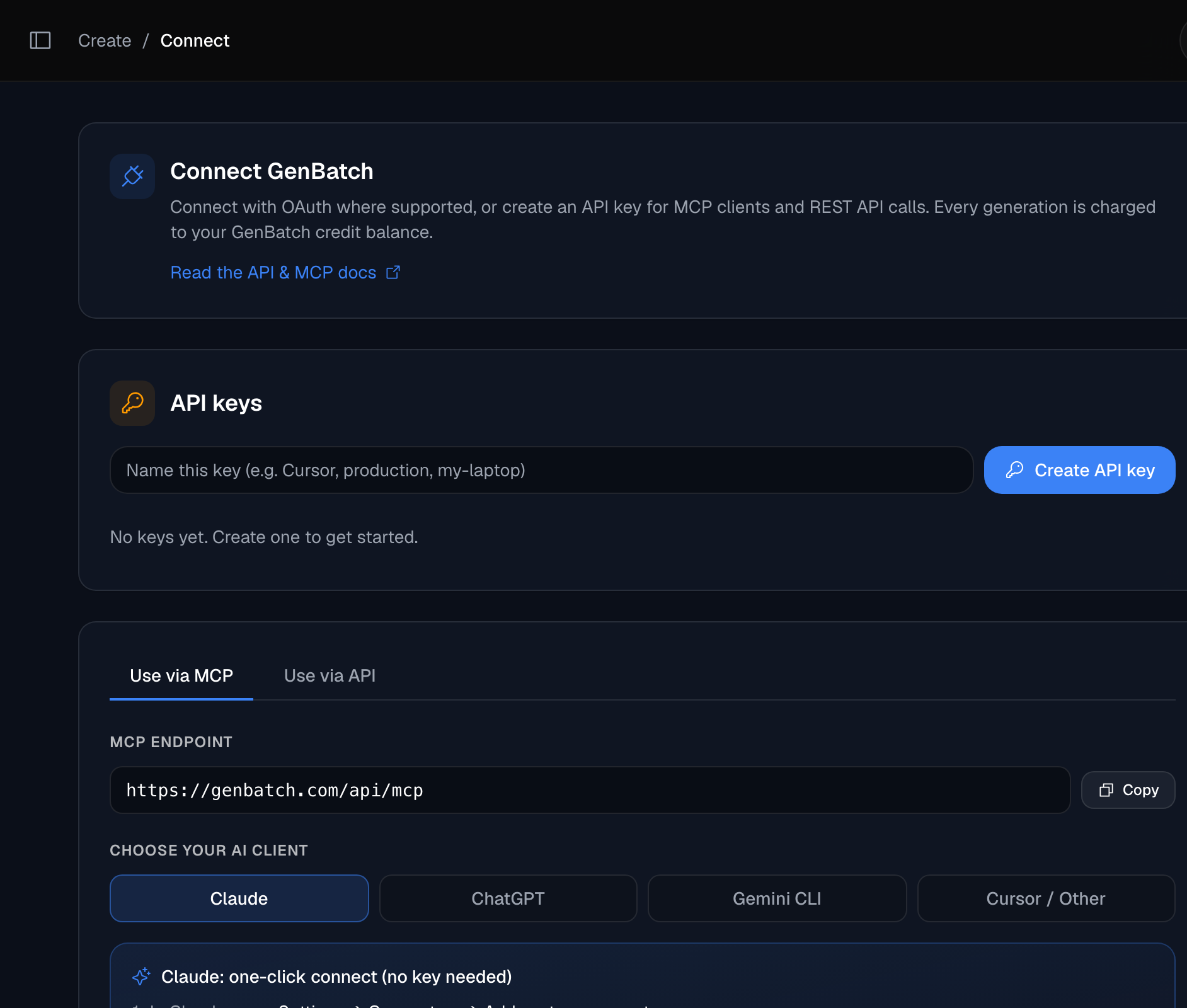
Three steps: choose an auth path, add the remote server, then ask for images. The whole thing takes about a minute, and you never leave your assistant after that.
Choose your auth path
In Claude, use the no-key connector flow: paste the MCP endpoint, sign in to GenBatch, and approve access. In ChatGPT, use the developer-mode connector flow. For Gemini CLI, Cursor, the MCP Inspector, custom clients, or the REST API, create an access key at /connect. It is shown once, so copy it somewhere safe.
Add the remote MCP server
In an MCP client such as Claude, ChatGPT developer-mode connectors, Gemini CLI, Cursor, or the MCP Inspector, add a remote MCP server pointing at https://genbatch.com/api/mcp. Claude can use the login-based connector flow. In ChatGPT, enable developer mode and create a connector with the endpoint URL. In Gemini CLI, run gemini mcp add --transport http --header "Authorization: Bearer gbm_your_key" genbatch https://genbatch.com/api/mcp. For other clients that ask for a bearer token, set the auth header to Authorization: Bearer gbm_your_key. The server name is genbatch, with tools for images, videos, job polling, balances, and wallet credit purchases.
Ask for images
Tell your assistant what you want, for example "generate 4 square product shots of a matte black water bottle." It calls generate_image, then polls check_job until the image URLs are ready.
Claude supports a login-based connector flow: paste the URL, sign in to GenBatch, and approve access. In ChatGPT, enable developer mode in Settings -> Apps & Connectors -> Advanced settings, then create a connector with the GenBatch MCP endpoint. In Gemini CLI, add the HTTP MCP server with gemini mcp add --transport http and an Authorization: Bearer gbm_your_key header. The bearer-token flow also works in Cursor, MCP Inspector, and other MCP clients that accept custom authorization headers. If you want the full walkthrough for Claude specifically, see our guide on generating images in Claude.
What can the GenBatch MCP tools do?

The core image loop is still simple: start a job, check on it, and read your balance. These tools map one-to-one onto how batch generation already works inside GenBatch, so nothing behaves differently just because you called it from Claude.
generate_imagesubmits a job. For one prompt, setpromptand optionallynumber_of_images(1 to 10),aspect_ratio(16:9, 9:16 or 1:1, plus 10 more shapes such as 3:2 and 21:9 whenimage_routeisreliable),image_model(gpt_image_2by default, ornano_banana_2), and public HTTPSreference_image_urlorreference_image_urls. For multi-prompt work, passitems[]with up to 20 prompts and 50 total images in one job; each item can also carry its own reference image URLs.check_jobtakes thatjob_idand reports status. While the job runs it says not ready. When it finishes, it returns a flatfilesURL list, agallery_urlwhen available, and animagesgrouping for multi-prompt jobs.get_creditsreturns your current spendable balance, so your assistant can warn you before you run low.get_balance,list_credit_packages, andbuy_credits_from_balancelet Claude inspect wallet balance and buy a credit package from existing wallet funds.text_to_videoandframes_to_videosubmit video jobs. A URL returned bycheck_job.filesfrom an image job can be passed intoframes_to_videoasstart_frame_url.
Generation is asynchronous. generate_image hands back a job_id immediately instead of blocking until the images exist, and check_job reports the status until the URLs are ready. Let your assistant run that polling loop. You just ask for the images and read the result.
Because these tools call the same job pipeline as the GenBatch app, a batch you kick off from Cursor is the same batch you would see in your dashboard. Bulk is the point here. Asking for 10 copies of one prompt is one call, and asking for several different prompts can also stay grouped as one batch through items[]. Reference image URLs guide the generation from an existing visual; they are not a guarantee of pixel-perfect photo editing.
How much does an image generation MCP server cost?
With GenBatch, one credit per image. Ask for 4 images and it costs 4 credits. You can use one-time credits or an optional subscription, and your credit balance is the real spending cap.
Billing is pay-on-success. Credits are checked upfront but only deducted after a generation actually succeeds, so a failed request does not cost you anything. If your balance is too low, the request is rejected with a clear message and nothing is charged. That is worth calling out, because a self-hosted server bills you for the model API call whether the result is good or not.
Connect your first MCP server
Generate images from Claude, ChatGPT, Gemini CLI, Cursor, or any client that supports remote MCP.
Open ConnectIs an image generation MCP server secure?
It can be, and GenBatch is built so a leaked key is a small, reversible problem. The access key is opaque, meaning it carries no readable claims like a JWT does. It is a gbm_ prefix followed by 64 random hex characters, and only its SHA-256 hash is stored on our side. We literally cannot show it to you again after creation.
A few more guardrails worth knowing:
- Revocable and capped. You can hold up to 10 active keys and revoke any of them instantly at /connect. Revoking kills both the MCP and REST access for that key at once.
- Scoped to you. A key only ever acts on its owner's account and credits. It cannot touch anyone else's.
- Ownership checks on results. When
check_joblooks up a job, it verifies you own that job. Passing an id you do not own returns "no job found" with nothing leaked about whether that job exists. - Abuse backstops. Sliding-window rate limits (200 generate calls per 10 minutes, 120 status checks per minute, 60 balance reads per 10 minutes, and 3 wallet purchases per 10 minutes) sit on top of credits as a runaway guard. In normal use your credit balance is the limit you notice, not these.
Can I use it from my own code instead?
Yes, and it is the same key. If you would rather call GenBatch from a script or backend than through an assistant, the REST API takes the exact gbm_ value you already created. Submit a job, then poll for the result.
curl -X POST https://genbatch.com/api/queue/submit \
  -H "Authorization: Bearer gbm_your_key_here" \
  -H "Content-Type: application/json" \
  -d '{
    "type": "create-image",
    "requestData": {
      "prompt": "a red fox in snow",
      "number_of_images": 1,
      "aspect_ratio": "1:1",
      "image_model": "gpt_image_2"
    }
  }'
The response includes a job id. Poll GET /api/results/<id> until the status is completed, and the image URLs come back in result_data.files[]. For the full endpoint list, parameters, and error codes, see the GenBatch image generation API reference. And if bulk is your main use case, our batch AI image generation guide covers the prompt-list and CSV workflow end to end, including how to generate 100 AI images at once.
Frequently asked questions
What is an image generation MCP server?
It is a server that exposes image generation as a tool your AI assistant can call over the Model Context Protocol. Once connected, you ask Claude, ChatGPT, Gemini CLI, Cursor, or another MCP client for images in plain language and it calls the tool for you. GenBatch runs a hosted one, so there is nothing to install.
Do I have to install or run the GenBatch MCP server myself?
No. GenBatch is a hosted remote MCP server. You add it by pasting the endpoint URL into your MCP client. Claude can use the login connector flow; clients without that flow can use a GenBatch access key. Most other image MCP servers are self-hosted, which means you run them locally and supply your own model API key.
How much does it cost to generate an image?
One credit per image. Asking for 4 images costs 4 credits. You can pay per use without a subscription or choose an optional monthly plan, and billing is pay-on-success, so a failed request costs nothing. If your balance is too low the request is rejected and nothing is charged.
Which MCP clients work with GenBatch?
Any client that supports remote MCP servers, including Claude, ChatGPT developer-mode connectors, Gemini CLI, Cursor, and the MCP Inspector. Claude and ChatGPT can use connector flows. Gemini CLI, Cursor, and manual clients can use the same endpoint with a GenBatch bearer key.
Is one access key enough for both MCP and the REST API?
Yes, for manual setup. One gbm_ key works for the hosted MCP server and the REST API. Claude can also use the no-key login connector flow. You can hold up to 10 active keys per account and revoke any of them instantly at /connect.
Which image models can the MCP server use?
You can pick gpt_image_2 (the default) or nano_banana_2, set the aspect ratio (16:9, 9:16 or 1:1, plus 10 more shapes such as 3:2 and 21:9 on the Priority route), generate 1 to 10 copies of one prompt, add public HTTPS reference image URLs, or use items[] for up to 20 prompts and 50 images total in one call.
Generate from where you already work
One endpoint, no install, pay per use. Add GenBatch to Claude, ChatGPT, Gemini CLI, Cursor, or your MCP client and start generating.
Get started